Holidays
Managing Holidays
Keeping your banking holidays up to date in Maxim Money is important. Because banks do not process transactions on public holidays, having an accurate holiday calendar ensures your transaction dates are logged correctly and prevents issues with scheduled payments or transfers.
You can add an unlimited number of holidays to your system, and each holiday can be applied to one or multiple countries, allowing you to manage international accounts seamlessly.
When adding a holiday, you can choose between two main configurations: Fixed Date or Rule-Based.
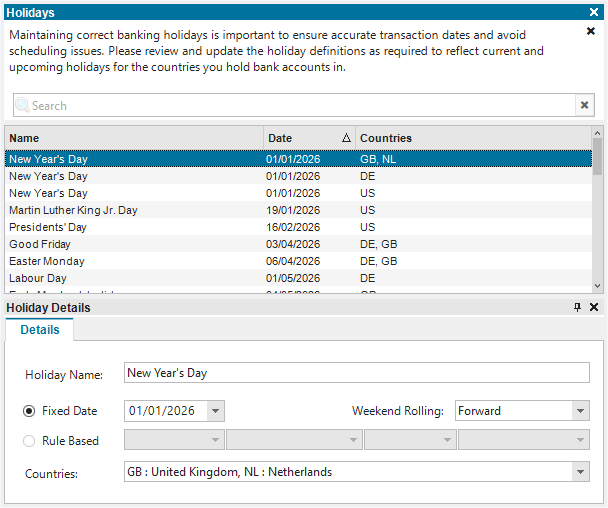
Fixed Date Holidays
Best for: Holidays that fall on the exact same date every year (e.g., Christmas, New Year's Day).
Because fixed-date holidays often fall on weekends (non-business days), you need to tell the system how to handle the banking holiday. You can specify a "rollover" rule to automatically adjust the date:
- None: The holiday is observed exactly on that date, with no adjustment.
- Forward: The banking holiday shifts forward to the next available business day (e.g., a Saturday holiday moves to Monday).
- Backwards: The banking holiday shifts back to the previous business day (e.g., a Saturday holiday moves to Friday).
- Nearest: The holiday shifts to whichever business day is closest to the fixed date.
Rule-Based Holidays
Best for: Holidays that change dates from year to year (e.g., Easter, Thanksgiving, early May Bank Holiday).
Instead of updating the calendar manually every year, you can build a custom rule so Maxim Money calculates the holiday automatically. You can define rules in two ways:
- By Day of the Week: Select a specific occurrence of a day (1st, 2nd, 3rd, 4th, or Last) and relate it to a month or Easter. For example, you can set a rule for the "Last Monday in May" or the "1st Friday before Easter".
- By Day Offset: Specify a set number of days relative to a month or Easter. For example, you can configure a rule for "3 days after Easter".