Filtering
Filtering Your Data
Maxim Money uses a universal filtering system across your Transaction Search, Charts, and Reports. This means once you learn how to build a filter in one place, you know how to use it everywhere.
To help you find exactly what you are looking for, you can toggle between two filtering modes: Simple and Advanced.
Simple Filters
Best for: Everyday searches and quick reporting
Simple filters are designed to be fast and intuitive. You just select the criteria you want to filter by, and then check the specific values you want to include.
- How the logic works: When you select multiple values within the same criteria, Maxim Money uses OR logic. When you add multiple criteria, it uses AND logic.
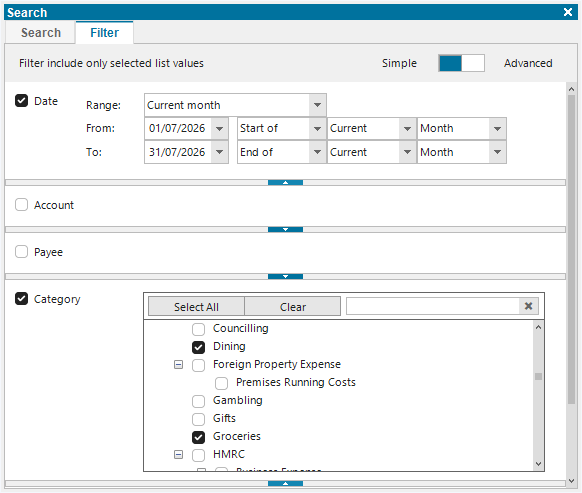
- Example: If you select the categories "Groceries" and "Dining" (from the Category criteria), and then select "Current month" (from the Date criteria), the system will show you transactions that are from Groceries OR Dining, AND that occurred This Month.
Advanced Filters
Best for: Highly specific, complex data requests
If the Simple filter isn't catching the exact slice of data you need, you can toggle the tool into Advanced mode. This opens up a fully customizable filter builder.
- Expanded Criteria: Unlocks additional, less commonly used filtering criteria that are hidden in the Simple view to keep the interface clean.
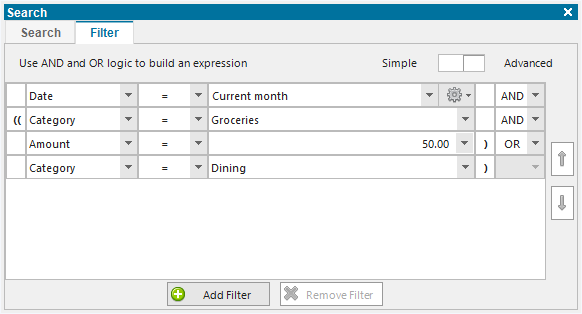
- Total Logic Control: You are no longer restricted to the default AND/OR setup. You can build exact, custom rules by combining AND/OR logic across any of your chosen values (for example: show transactions that are either [Category = Groceries AND Amount > 50] or [Category = Dining]).