Investment Portfolios
Investment Portfolios
The Portfolio view allows you to see all your holdings in that portfolio, plus any associated cash accounts. Maxim Money allows one single cash account per currency within a portfolio.
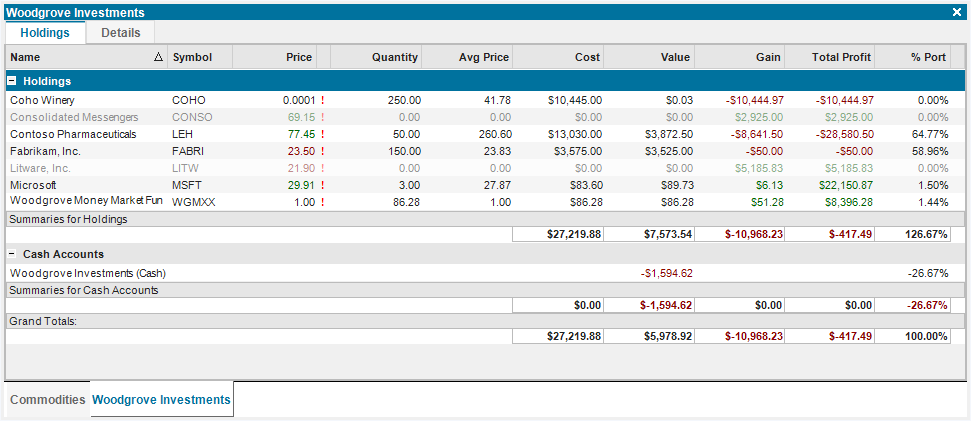
Name is the name of the investment.
Symbol is a market identifier for the holding. Securities can have multiple identifiers, so this can be any of these that make sense to you. This identifier will be used to download pricing, once this has been enabled.
Price is the most recent market price. This will show in red if it is lower than the previous price, and green if higher.
Quantity is the number of shares currently held.
Avg Price is the average price paid for the current shares held.
Value is the current value of the investment, in the currency of the investment.
Cost is the cost basis for the investment, calculated using First In, First Out (FIFO) method.
Gain is the profit or loss derived from the shares you currently hold, plus any dividends received on the investment.
Total Profit is the total profit or loss of the investment over the lifetime of the investment.
Once investments have been sold out of completely, they are perceived as "closed", and will dim within the portfolio. To hide these accounts completely, select Accounts > Hide Closed Accounts from the right-click menu.
To view the individual transactions of a holding, simply double-click on it to open a transactions window.
Configuration
To rename your portfolio, specify the currency, or to set which investments is supports, select the Details tab:
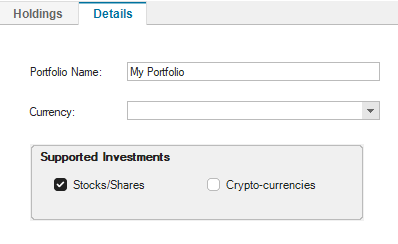
If Currency is left blank, the portfolio will support multiple currencies (allowing multiple cash accounts in the portfolio, one for each currency). Valuation of the portfolio will be done in the system default currency.
Adding New Investments
Whenever you select the Portfolio window, the Portfolios context menu will appear:
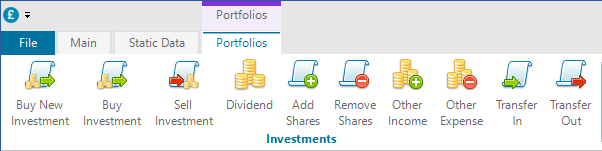
To add a new investment, simply click on the relevant button, depending whether you want to buy, sell, add a dividend, add or remove funds.
- Buy New Investment - this will add holdings for a new asset to your portfolio.
- Buy Investment - this will add funds to your portfolio, taking removing cash from the linked cash account.
- Sell Investment - this will remove funds from your portfolio, adding the cash to the linked cash account.
- Dividend - this records a dividend at the current holding, and adds the cash to the linked cash account.
- Add Shares - this simply adds funds to your portfolio, but will not affect the cash account.
- Remove Shares - this simply removes funds from your portfolio, but will not affect the cash account.
- Other Income - this introduces a cash gain to the portfolio
- Other Expense - this introduces a cash deduction from the portfolio
- Transfer In - this allows you to transfer a holding into the portfolio. Lot allocation is preserved.
- Transfer Out - this allows you to transfer a holding out of your portfolio. Lot allocation is preserved.
Selecting any of the investment actions above will bring up the transaction window like so:
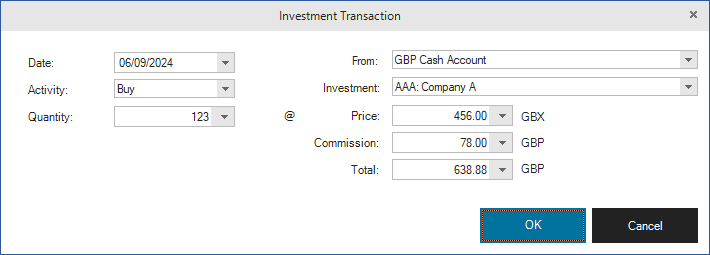
Depending which investments are supported in the portfolio will affect what is available in the Investment drop-down list. If the portfolio is configured to support stocks/shares and you type a value into the Investment field, it will either select an existing investment, or Maxim Money will assume you wish to create a new investment. If this is the case, it will bring up the Security window, and you will need to populate details of the new security.
Pricing of a security can be scaled by any factor you like. This multiplies the price by the factor, but doesn't affect the calculations. For example, most US stocks are priced in dollars (USD) so the display factor is set to 1. But most UK stocks are priced in pence (GBX), so the display factor should be set to 100. To change the price display factor, just edit the security. You can do this by right-clicking on the investment in your portfolio and selecting Edit Security.
Most investment transactions will have an associated account that any funds are paid from or to. This will normally be a cash fund within the portfolio, but you can specify any account of the relevant currency from the drop-down list.
Stock Splits
Periodically, companies will split (or combine) their stocks. This is known as a Corporate Action. Usually the price will be reflected to match, so for example, if the company splits their stocks 2 for 1, the number of shares you hold would double, but the price would halve. This is done to keep the price reasonably the same over time, if it goes up or down by a large amount. To record this in Maxim Money, select the holding in the Portfolio, right-click and select Record Stock Split. This will bring up the Stock Split window like so:
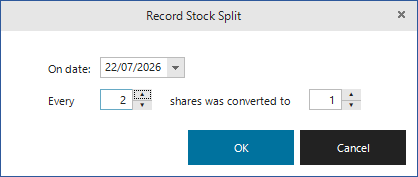
Enter the date the split became effective from, and the ratio of shares to split or combine. Maxim Money will then modify your shareholding with the converted amount. The split action is shown as a transaction in the security register.
Watch Lists
Watch Lists allow you to track the price of investments that you don't hold. Normally Maxim Money will only download prices for held securities.
Watch Lists aren't strictly supported by Maxim Money yet. But you can still do it pretty easily, as follows:
- Create a new portfolio, called Watch List.
- Click on Buy New Investment
- Select, or enter details of the investment you want to track
- Add an insignificant quantity, e.g. 0.00000001
Maxim Money will now treat this as a holding and download the prices, but the value should remain at zero because the nominal is so small.