Prices & FX Rates
Prices & FX Rates
The Prices & FX Rates view allows you to see all the securities and currency pairs that Maxim Money has a price for.
You can search for a pair or currency code using the search box at the top of this form. This filters down the list of codes on the left hand side.
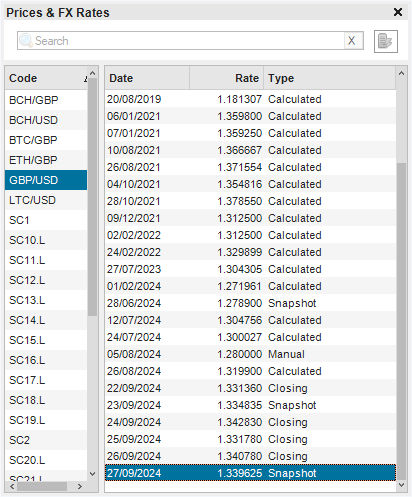
To add new securities to the list, you need to create a transaction in a portfolio for a new security identifier. To add a new currency pair to the list, you need to create a transfer transaction between two accounts of differing currency.
Rates can be manually added, removed and modified by using the right-click menu on the rates grid.
Rates can be downloaded from online sources by going into Settings (click on the  icon in the top-right of the main form)
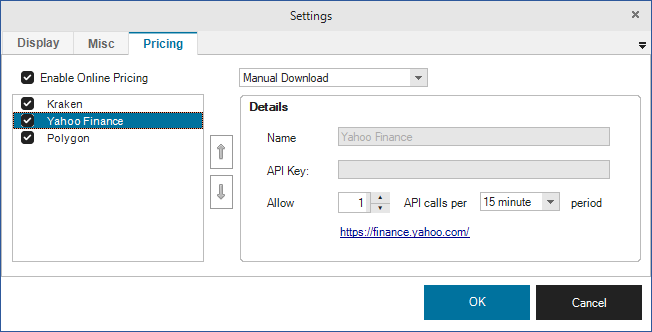
To enable online pricing, check the Enable Online Pricing checkbox. You can then specify whether prices will be downloaded manually, or automatically.
If you select Manual Download, no prices will be downloaded unless you request them. To do this, click on the icon to the right of the Search box in the Prices & FX Rates form.
If you select Automatic Download, prices will automatically download during the day, based upon the frequency specified on each price source.
The priority of price sources cannot yet be specified, but will soon be configurable using the Up / Down buttons.
Each price source can be individually enabled or disabled by toggling the checkbox in the price source list.
Details
Each Price Source has its own configuration.
Name: This is just the name of the price source. This will become editable for custom price sources (in a future release)
API Key: Some price sources may require an API key in order to request data. This is a private key that uniquely identifies you to the data provider (instead of having to provide a username and password). For example, you can create a free account on Polygon to request data. When you create an account, you will be assigned an API key. This needs to be pasted in here.
API calls: API data providers often monitor connections. If too many requests are made to the provider, they may temporarily (or permanently in severe cases) block your IP address. This means you will no longer be able to download data from that provider. To mitigate this, Maxim Money will limit how often it requests data from each provider. This can be restricted as the number of API requests per period. Official APIs often document how often you can request data, but any unofficial APIs are more likely to block or reject requests. Maxim Money defaults the access on APIs, but you may wish to adapt these to your needs. If you don't need frequent price updates, it makes sense to increase the period on the data requests to reduce your likelihood of being blacklisted.