Upgrading from MS Money
Upgrading from Microsoft Money
The easy way...
Maxim Money should now be able to directly load MNY files from Microsoft Money. You can either use the File > Open File menu, or File > Import... and select your MNY file. This is the recommended way to bring your data into Maxim Money, as it will then import
- All of your Institutions, Accounts, Payees, and custom Categories.
- Every past transaction, including complex, multi-line Splits.
- We accurately link Transfers from one account to another, ensuring a payment from your checking to your credit card isn't accidentally counted as a duplicate expense.
- Your complete Investment portfolio, transaction history, and historical price data.
- Your master list of Scheduled Transactions.
If for any reason, the MNY file does not import, please contact us directly at support@maxim-money.app and we will investigate. There are multiple versions of MNY files, and we may not have identified them all.
The more traditional way...
If the above does not work for any reason, you can still bring your data across by exporting each account from Microsoft Money, and importing that account into Maxim Money.
Maxim Money will automatically add other accounts it comes across in imported transfers, and so you generally want to import your accounts in order of how many transfers they make to other accounts. Most typically, this would be any current accounts you have first, followed by auxiliary/savings accounts.
To export an account in Microsoft Money, select File > Export...
This will bring up a dialog box like so:
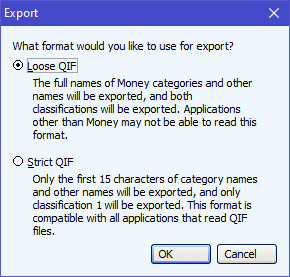
Keep the Loose QIF option (as basically this just prevents your data being truncated) and click OK.
Choose a file name and location to store your data in, and click OK. It will then ask you which type of account you wish to export:
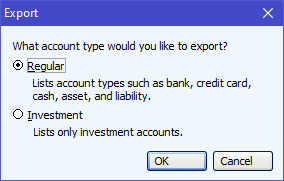
To export normal cash accounts, select Regular. To export any Investment Portfolios, select Investment. Then click OK. NB. When exporting investment portfolios, you need to export both the transactions, and the cash separately. You can then merge these back together within Maxim Money.
Then choose the account you wish to export. You should receive a confirmation like so:
Now all you need to do is import this QIF file into Maxim Money.