Why Now is the Time to Retire Microsoft Money
2026-04-24
For many of us, Microsoft Money wasn't just a piece of software; it was a daily companion. Launched in an era before "the cloud" was a household term, it provided a level of desktop-based financial control that was, for a decade, unmatched. Its interface was familiar, its reporting was robust, and its offline nature felt secure.
However, we are now in 2026. The technical landscape has shifted beneath our feet, and what was once a sturdy financial foundation is now a crumbling ruin held together by third-party patches and nostalgia. If you are still running Microsoft Money "Sunset Edition," you aren't just using old software—you are taking unnecessary risks with your financial data.
Here is why it is finally time to hang up the jersey and move to a modern successor like Maxim Money.
The Internet Explorer "Ghost"
The most critical flaw in Microsoft Money isn't actually in the program itself—it’s in what it’s built upon. Microsoft Money used the Internet Explorer (IE) rendering engine for its entire interface.
As of 2026, Internet Explorer is not just "retired"; it is a security liability that has been stripped from modern Windows kernels. When you run Microsoft Money today, you are forcing your operating system to call upon legacy DLLs and browser components that no longer receive security updates. Every time you click a report or open the home screen, you are interacting with code that was never intended to survive into the mid-2020s.
Internet Explorer cannot be installed on Windows 11. As such, some features of Microsoft Money no longer work under the newer operating system.
The 32-Bit Bottleneck
Microsoft Money is a 32-bit application designed for a 32-bit world. Modern computers are built on 64-bit architecture, optimized for massive amounts of RAM and multi-core processing.
Running a 32-bit financial suite in 2026 is like trying to drive a vintage tractor on a high-speed motorway. You’ve likely noticed the "stuttering." As your file size grows over years of data entry, the program struggles to map the memory it needs. It’s slow to open, prone to "Not Responding" crashes during heavy reporting, and can’t take advantage of the hardware you’ve actually paid for.
The Death of Data Feeds
Remember when Microsoft Money used to download your bank transactions and stock prices automatically? Those days ended years ago when the servers were switched off.
Most dedicated users have stayed loyal by using third-party add-ons to convert CSV files or scrape stock prices. But let’s be honest: this is a chore, and in most cases introduces an additional cost. Relying on a chain of "converters" means that if a bank changes its export format, or a stock-price scraper breaks, your entire financial workflow grinds to a halt. You shouldn't have to be a hobbyist programmer just to see your net worth.
High-DPI and Modern Display Failures
Have you tried running Microsoft Money on a 4K or 5K monitor? The experience is painful. Because the software was written before high-density displays existed, the fonts are either microscopically small or blurry and pixelated. The "UI scaling" in Windows tries its best, but the icons and charts in MS Money frequently break, overlap, or disappear entirely. Your financial data deserves to be viewed with clarity, not through a 2005-era squint.
Security in a Connected World
Your financial data is your most sensitive asset. Microsoft Money stores data in a .mny file format that was designed before modern encryption standards became the norm. While you can password-protect the file, the underlying database lacks the sophisticated "At Rest" encryption that modern financial apps provide. Furthermore, because the software is no longer updated, any new vulnerabilities discovered in the way it handles data will never be patched.
Why Maxim Money is the Natural Successor
When we set out to build Maxim Money, the goal wasn't to "rebuild" Microsoft Money. The goal was to build what Microsoft Money would have been if it were created in 2026.
Native 64-Bit Power
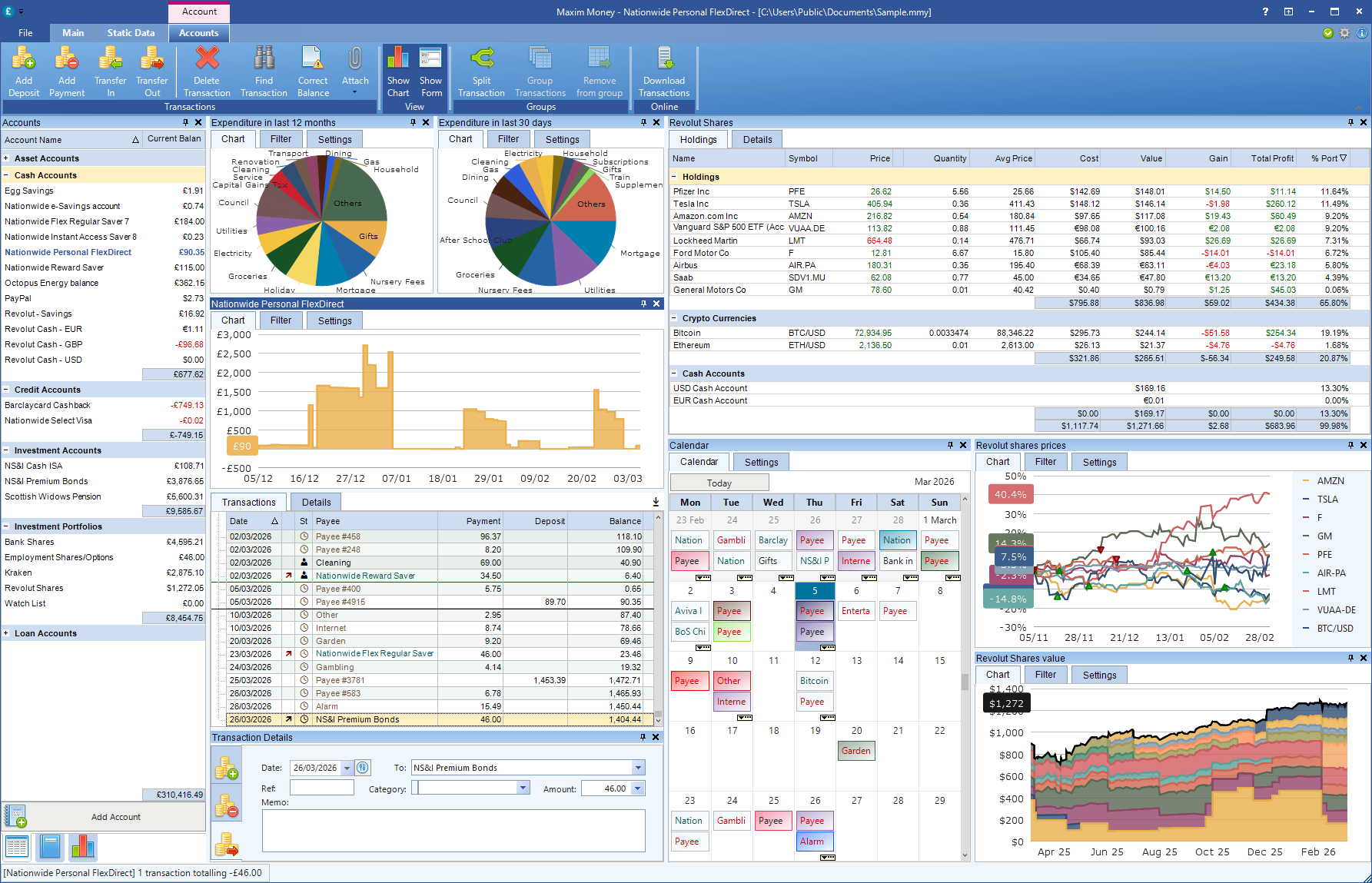
Maxim Money is a modern, 64-bit application. It handles decades of data with zero lag. Whether you have 500 transactions or 50,000, the reports generate instantly. We built it to use modern multi-threading, meaning your hardware finally gets to work for your finances.
Open Banking Integration
Forget the CSV converters. Maxim Money leverages Open Banking API technology (and MTD 2026 compliance for UK users). Your transactions flow securely and directly into your registers. No scrapers, no third-party patches, no "Sunset Edition" workarounds. It just works.
A Modern UI (Without the IE Baggage)
Maxim Money uses a clean, high-DPI-ready interface that looks beautiful on everything from a laptop screen to a 34-inch ultrawide monitor. We’ve kept the logical "Register" feel that MS Money users love, but stripped away the clunky, browser-based navigation of the past. We have even added a Microsoft Money theme, to retain the look and feel that you're used to.
Privacy First
Unlike many "free" modern alternatives that sell your data to advertisers, Maxim Money follows the old-school philosophy: You are the customer, not the product. Your data stays under your control, on your own machine and encrypted with 2026 standards.
Conclusion
The transition from Microsoft Money is emotional. It represents years of history. But there comes a point where "sticking with what you know" becomes a liability.
If you’re tired of the crashes, the manual data entry, and the fear that a Windows update will finally break your financial file forever, it’s time to move. Maxim Money was built by people who loved the depth of the old tools but demanded the speed and security of the new ones.
The sunset has finally passed. It's time for a new day with Maxim Money.