Your Finances in Your Pocket: Maxim Money Mobile Is Now Live
2026-11-10
Some of the most important moments in managing your money don't happen at your desk. They happen at the till, in the car park, or on the way home, when you want to know whether that payment has gone out, or you need to note down what you've just spent before you forget.
Over recent weeks, a group of dedicated testers has been putting our mobile companion app through its paces. Thanks to their feedback, we're delighted to announce that Maxim Money Mobile is now live on the App Store and Google Play.
Your Accounts, Wherever You Are
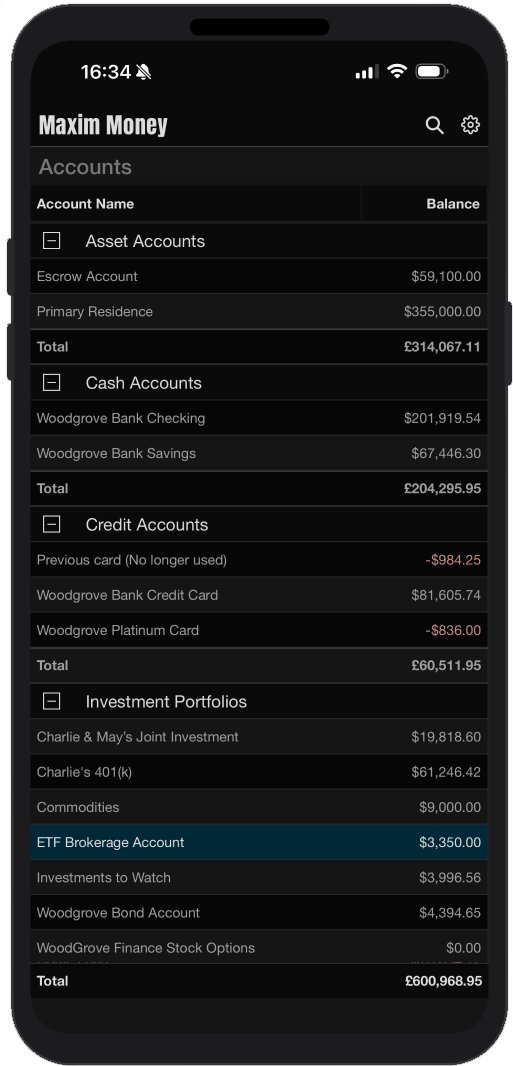
Maxim Money Mobile puts your accounts, transactions and portfolios on your iPhone, iPad or Android phone. It isn't a cut-down viewer. It's a genuine companion to Maxim Money for Windows:
- Accounts at a glance: See your accounts grouped exactly as they are on your PC, with totals for each group and overall, in your base currency. Turn your phone to landscape to see each balance as of today and including future transactions.
- Full registers: Add, edit and delete transactions, with payees, categories, memos and references. Amount fields even have a built-in calculator.
- Split transactions: Turn a payment or deposit into a split and add its members, with the total kept as the sum of its parts.
- Transfers: Tap a transfer's arrow to jump straight to the other account.
- Search: Find transactions by payee, memo or amount, narrow the results by category, and see the total of everything you found.
- Investments: View your portfolios and holdings, and fetch the latest prices on your phone.
No signal? No problem. Changes you make offline are kept and sent the next time you're connected.
Your Cloud, Your Data
From the start, Maxim Money has been built around one principle: your financial data belongs to you. Your data file lives on your own PC, not on our servers. We weren't prepared to give that up just to put your finances on your phone.
Instead of syncing through a Maxim Money cloud service, the mobile app syncs through your own cloud storage. You can use Dropbox, Google Drive, OneDrive, or a WebDAV folder such as Nextcloud, pCloud, Koofr or a NAS at home.
- Encrypted before it leaves your device: Your data is encrypted with your own sync password (AES-256) before it's uploaded, so your cloud provider only ever sees scrambled files.
- It never passes through us: Your data goes directly between your devices and your chosen cloud storage. It never touches our servers.
- Locked down on the phone: The copy on your phone is encrypted too, and you can require your fingerprint, face or screen lock to open the app.
- Limited access: The app can only see its own folder in your cloud storage, never the rest of your files.
Set It Up Once, Then Forget About It
Getting started takes a few minutes. In Maxim Money on your PC, open Settings, go to the Mobile Sync tab, choose your cloud service, sign in, and pick a sync password. On your phone, choose the same service and enter the same password, then tap Sync now.
From then on, syncing looks after itself. Your PC syncs after you open and save your data file. Your phone syncs when you open the app, when you return to it, and shortly after you make a change. If you ever change the same detail on both devices, the phone keeps its version and lists the other for you to review, so nothing is quietly overwritten.
Full setup instructions are in our Maxim Money Mobile help guide.
Included With Every Edition
The companion app works with every edition of Maxim Money, including the free Basic version. And true to our one-time purchase promise, there's no extra subscription to unlock it.
A Big Thank You to Our Testers
Maxim Money Mobile is a better app because of everyone who joined the open test, reported problems and suggested improvements. Thank you.
Get Maxim Money Mobile today. Search for "Maxim Money" on the App Store, or download it from Google Play. If you don't have Maxim Money for Windows yet, download the free trial and have your finances on your PC and in your pocket.
As always, we'd love to hear what you think, either on our forum or at support@maxim-money.app.